Practical spreadsheets and data
How to combine percentages: a weighted average in Excel
Decide whether each booking or each session should have equal weight. One small example explains both answers and gives formulas for the combined rate.
Start with the question
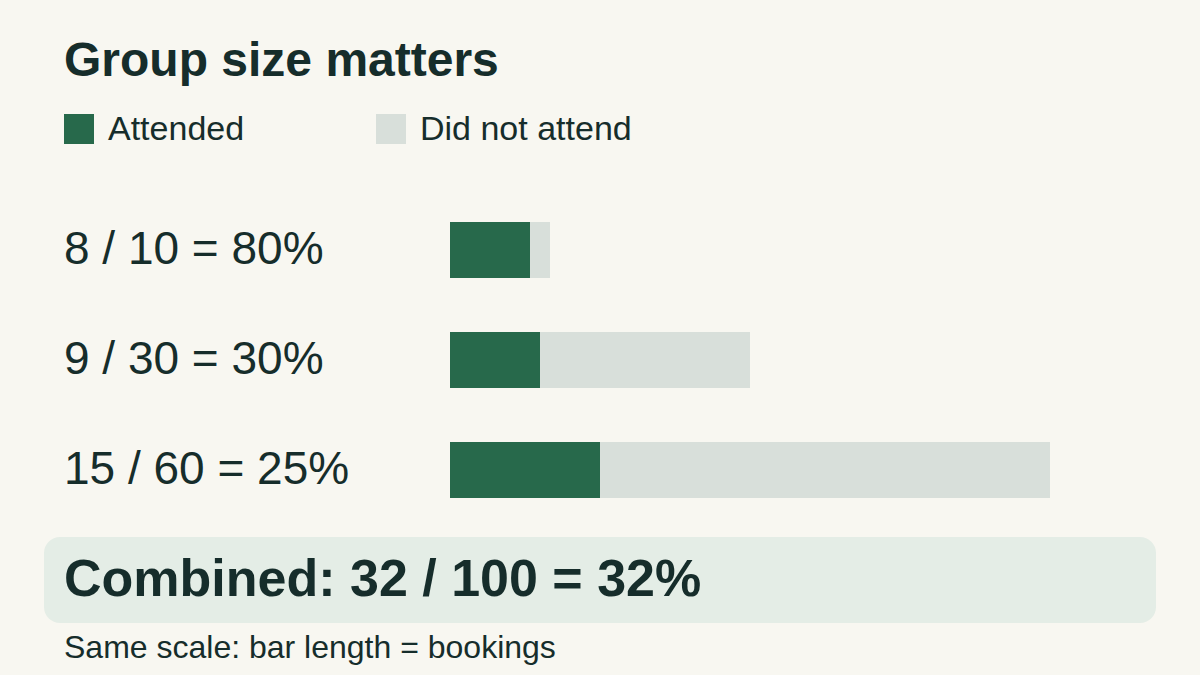
For the share of all bookings that resulted in attendance, add the attendance counts and divide by all bookings. In this fictional example, the result is 32%. Averaging the three session percentages gives 45%: a different answer to a different question.
Imagine three workshops. One booking means one person reserved one session; “attended” counts bookings where that person showed up. A person at two sessions contributes two bookings and, if present at both, two attendances. We are counting attendance instances, not unique people.
Three sessions, two useful summaries
- A: 8 attended out of 10 bookings → 80%.
- B: 9 attended out of 30 bookings → 30%.
- C: 15 attended out of 60 bookings → 25%.
Combine the counts
text
Total attended = 8 + 9 + 15 = 32
Total bookings = 10 + 30 + 60 = 100
Overall attendance rate = 32 / 100 = 32%
Mean session rate = (80% + 30% + 25%) / 3 = 45%
The two summaries use different weights.
What does each result mean?
The 32% figure gives every booking equal weight. Session C accounts for 60 of the 100 bookings, so it must influence this total more than session A. Multiplying each session’s rate by its bookings recovers its attendance count: 80% × 10 = 8, and similarly for the other rows.
The 45% figure gives every session equal weight. It is the arithmetic mean of the three session rates. Use it when that is your intended measure, and label it accordingly. If all sessions have equal booking counts, these two averages coincide.
Copy this small example into Excel
Paste the tab-separated block into A1 of a blank sheet. It should occupy A1:C4; if it lands in one column, split it using Tab as the delimiter. Put Rate in D1, enter =B2/C2 in D2, and fill down to D4. Format D2:D4 as Percentage.
Data for A1:C4
text
Session	Attended	Bookings
A	8	10
B	9	30
C	15	60
These are invented counts for this lesson.
Overall rate from the counts
text
=SUM(B2:B4)/SUM(C2:C4)Enter in an unused cell and apply Percentage format: 32%.
The same result from rates and their denominators
text
=SUMPRODUCT(D2:D4,C2:C4)/SUM(C2:C4)Use the unrounded formulas in D2:D4. The weighted result is 32%.
Function names and percent format
For Russian-language Excel, the corresponding formulas are =СУММ(B2:B4)/СУММ(C2:C4) and =СУММПРОИЗВ(D2:D4;C2:C4)/СУММ(C2:C4). Argument separators depend on regional settings; the examples use a comma for English and a semicolon for Russian.
The stored result 0.32 displays as 32% with Percentage format. Do not multiply by 100 and also apply that format. Microsoft’s linked references document percentage formatting and the SUMPRODUCT/SUM pattern.
Check before you combine
- Keep the denominators. Rates alone generally cannot determine the pooled rate; do not assume the groups are the same size.
- Prefer original counts. Reconstructing counts from rounded percentages can change the answer. Display rounding is fine when formulas retain the underlying values.
- Check numeric cells. Text such as an imported “80%” may look numeric; SUMPRODUCT treats nonnumeric entries in its array arguments as zero. Use matching ranges of equal size.
- A zero-booking session has no defined rate: do not calculate its row as 0/0. With valid raw counts, the counts formula still works when the combined denominator is positive. If the total denominator is zero, report “not defined”, not 0%. Missing counts need investigation, not replacement with zero.
- Use the same definition in every row: here, attended bookings divided by bookings. Count each booking once, and do not mix registrations, page views and unique people.
Try another pair
The worked answer is in the next section; the exercise also works without JavaScript.
Answers and explanations
- About 53.3%: That averages 60% and about 46.7%, giving each session equal weight. The question gives each booking equal weight.
- 50%: Yes: (3 + 7) / (5 + 15) = 10 / 20 = 50%.
- 10%: Ten is the count of attended bookings. Divide it by the 20 bookings, then express the result as a percentage.
Practice answer
Together D and E have 10 attendances from 20 bookings: 50%. Their equally weighted mean session rate is about 53.3%. Before choosing a formula, finish the sentence “percentage of all …” and name exactly what the denominator counts.