Practical spreadsheets and data
Percentage points vs percent: why 12% to 15% is a 25% rise
Both answers are correct: the rate rose by 3 percentage points, or by 25% of its starting value. Use the unit that answers your question.
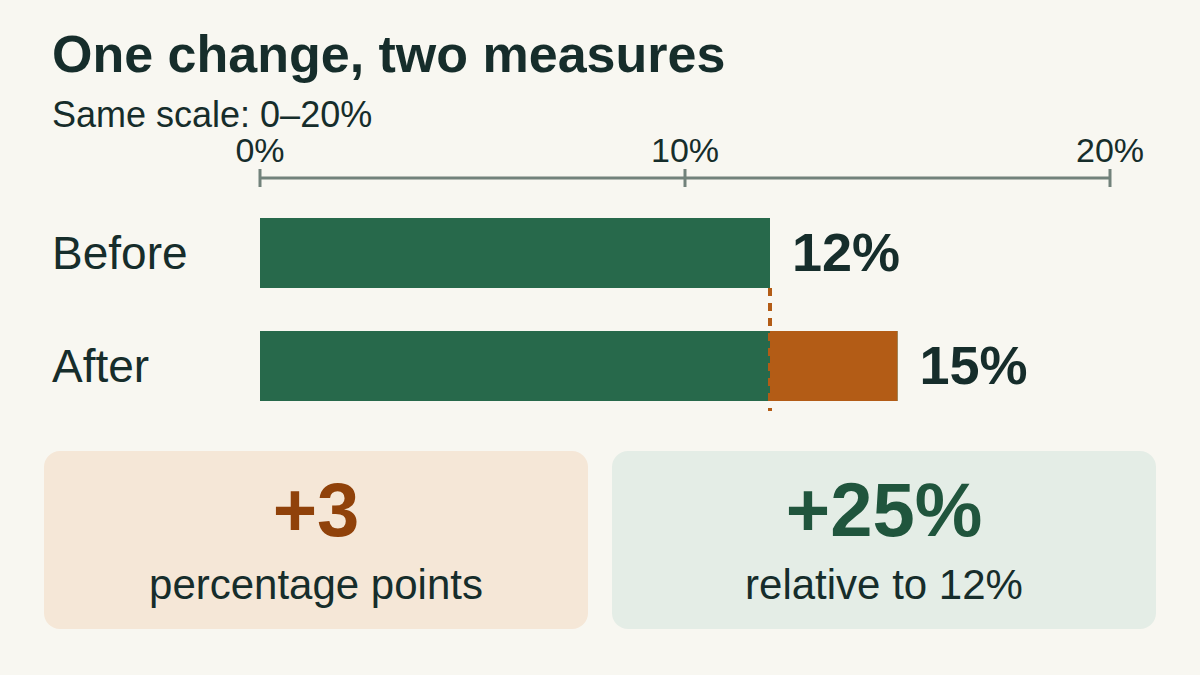
Two questions about the same change
Suppose 12 of 100 forms were completed in one batch and 15 of 100 in the next. These are invented teaching numbers: the completion rate moves from 12% to 15%.
Percentage points measure the gap between the two rates. Relative percent change measures that gap against the starting rate. The ONS definition and Microsoft formula are linked below.
Calculate both changes
text
Point change: 15 − 12 = +3 percentage points
Relative change: (15 − 12) / 12 × 100% = +25%
The starting rate, 12%, is the baseline for relative change.
Choose a clear sentence
For a report, write: “The completion rate rose from 12% to 15%, an increase of 3 percentage points (25% relative to the starting rate).” Including both endpoints makes the comparison checkable.
A rise of 3% relative to 12% would instead give 12% × 1.03 = 12.36%. The phrase “up 3%” therefore does not describe this move to 15%.
Compare the same measure, defined the same way. A change in a rate alone does not tell you how the number of completed forms changed if the total number of forms also changed. These calculations do not establish why the rate changed.
Calculate it in Excel
On a blank sheet, type Old rate in A1 and New rate in B1. Enter 12% in A2 and 15% in B2, including the percent signs. The numeric values are 0.12 and 0.15; the percentage format displays them as 12% and 15%.
Label C1 Change (percentage points) and D1 Relative change. Enter the following formulas in C2 and D2.
C2: change in percentage points
text
=(B2-A2)*100Set C2 to Number format: the result is 3. Its unit comes from the column heading.
D2: relative percent change
text
=B2/A2-1Set D2 to Percentage format: the result is 25%. Do not multiply this formula by 100.
Keep the formats separate
C2 already contains the number of percentage points. Formatting that 3 as a percentage would display 300%. D2 contains 0.25, which percentage formatting displays as 25%.
Use enough decimal places to retain small changes. The formulas use only cell references and arithmetic operators; no translated function names are needed. Microsoft documents the percentage display and the equivalent change formula (new − old) / old.
Three useful checks
- Reverse the comparison: 15% to 12% is −3 percentage points, but −20% relative change: (12 − 15) / 15 = −0.20. The baseline is now 15%.
- Small rates: 0.4% to 0.6% is +0.2 percentage points and +50% relative change. A large relative percentage can accompany a small point change.
- Zero baseline: 0% to 2% is +2 percentage points. Relative change is undefined because it would divide by zero; report the endpoints and point change.
Scope of the relative comparison
Here the rates are nonnegative, and relative change requires a positive starting rate. If your measure can be negative, such as a signed growth rate, state the two values and their point change; establish how to interpret a relative comparison before using it. Calculate from unrounded values when you have them.
Try a decrease
The worked answer follows. You can read it without JavaScript.
Answers and explanations
- −2 percentage points; −2% relative change: The point change is −2. Divide that difference by the starting 8 to get the relative change.
- −2 percentage points; −25% relative change: Correct: 6 − 8 = −2 points, and (6 − 8) / 8 = −0.25 = −25%.
- −25 percentage points; −2% relative change: The units are mixed up. The gap between 8% and 6% is 2 percentage points.
Answer
The change is −2 percentage points and −25% relative to the initial 8% rate. A clear sentence is: “The error rate fell from 8% to 6%, a decrease of 2 percentage points, or 25% of the starting rate.”