Meeting moved by an hour? Check the time zone in the .ics file
Two recurring meetings can start at the same instant and diverge after a clock change. Check whether the series follows a city’s local time or UTC, then compare specific dates. A single exported occurrence cannot reveal the whole rule.
Start with the meeting that moved
A weekly call shows 15:00 in Amsterdam on 23 October 2026. A week later it appears at 14:00. Before moving it by hand, establish what should stay constant: 15:00 in Amsterdam, 09:00 in New York, or a fixed UTC time. Those are different schedules.
This worked example compares two invented series that start at the same instant. It is a read-only diagnostic for timed, weekly meetings; no calendar account or private invitation needs to be uploaded.
Why these three Fridays differ
The Netherlands puts its clocks back on 25 October 2026, from 03:00 to 02:00. New York changes on 1 November, from 02:00 to 01:00. The cities therefore change on different weekends.
On 23 October, Amsterdam is UTC+02:00 and New York UTC−04:00. On 30 October they are UTC+01:00 and UTC−04:00. On 6 November they are UTC+01:00 and UTC−05:00. The gap is six, five, then six hours. These dates and cities matter: do not apply this table to every country or year.
Two rules, the same first meeting
In an iCalendar file, DTSTART identifies the start. A TZID points to a time-zone definition; a trailing Z means UTC. The weekly rule below includes three starts, counting the first. These are explanatory excerpts, not complete files to import. Example A assumes a valid Europe/Amsterdam definition for these dates.
A: keep 15:00 in Amsterdam
text
DTSTART;TZID=Europe/Amsterdam:20261023T150000
RRULE:FREQ=WEEKLY;COUNT=3
The local clock time stays at 15:00. Its UTC equivalent can change.
B: keep 13:00 UTC
text
DTSTART:20261023T130000Z
RRULE:FREQ=WEEKLY;COUNT=3
The UTC clock time stays at 13:00. Its Amsterdam equivalent can change.
Compare the resulting starts
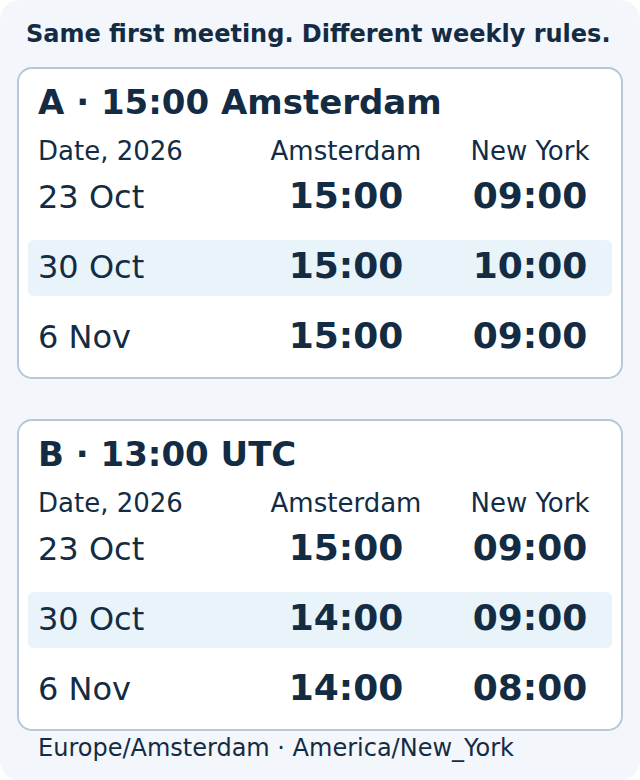
Each line gives Amsterdam / New York / UTC. All three entries on a line represent the same instant on the stated date. Coru computed these examples using Python zoneinfo and checked the 2026 transition dates against the official sources.
- A, 23 October: 15:00 / 09:00 / 13:00.
- A, 30 October: 15:00 / 10:00 / 14:00.
- A, 6 November: 15:00 / 09:00 / 14:00.
- B, 23 October: 15:00 / 09:00 / 13:00.
- B, 30 October: 14:00 / 09:00 / 13:00.
- B, 6 November: 14:00 / 08:00 / 13:00.
Read your copy without changing it
If you already have an .ics invitation or export, open a copy through a plain-text editor’s Open command. A double-click may launch a calendar import instead. Keep the original and inspect locally.
- Find the intended event between BEGIN:VEVENT and END:VEVENT, using its title (SUMMARY) and identifier (UID). A file can contain several events.
- Within that event, inspect DTSTART and RRULE. A DTSTART inside VTIMEZONE describes a zone transition, not your meeting.
- A timed DTSTART with neither TZID nor a final Z is floating time: it does not identify one shared instant across different zones. A date-only all-day entry is outside this example.
- If there is no RRULE, stop this comparison. An export may contain one occurrence or separate entries. One UTC start alone does not establish how the original series repeats.
Check the whole series, then the display
Real series can add dates with RDATE, exclude them with EXDATE, or modify an occurrence in another event carrying RECURRENCE-ID. Such exceptions can change the result. Zone definitions may use names other than Europe/Amsterdam; do not guess their meaning or replace them mechanically. This two-line comparison is a clue, not a full calendar validator.
Also check the calendar’s display zone. For example, Google Calendar can show an event in each invitee’s local zone. A changed display setting is different from a changed meeting. Compare the same occurrence date and zone on both screens.
Confirm the intended rule
For our Amsterdam-based series, a useful confirmation is: “Fridays at 15:00 Europe/Amsterdam. On 30 October 2026 that is 10:00 America/New_York and 14:00 UTC.” Ask the organizer to confirm the rule and the particular occurrence if they disagree.
If the agreed rule is 15:00 Amsterdam, series A fits all three Fridays. If it is 13:00 UTC, series B fits. Neither keeps 09:00 New York throughout. Use the organizer’s calendar controls for any correction and check all three dates afterward; changing an .ics line and reimporting it is not this diagnostic.
Check a different anchor
Choose an answer, or open the explanations below.
Answers and explanations
- 14:00: Yes. New York is UTC−04:00, so 09:00 is 13:00 UTC. Amsterdam is UTC+01:00: 14:00.
- 15:00: That assumes a six-hour gap. On this date Amsterdam has changed its clocks and New York has not: the gap is five hours.
- 16:00: Convert through UTC: 09:00 New York becomes 13:00 UTC, then 14:00 Amsterdam.