Practical spreadsheets and data
Compare two CSV files by ID in Python: added, removed and changed records
Match records by a stable ID, then compare their fields. Two exports can each contain three records while one ID disappears, one arrives and another record changes.
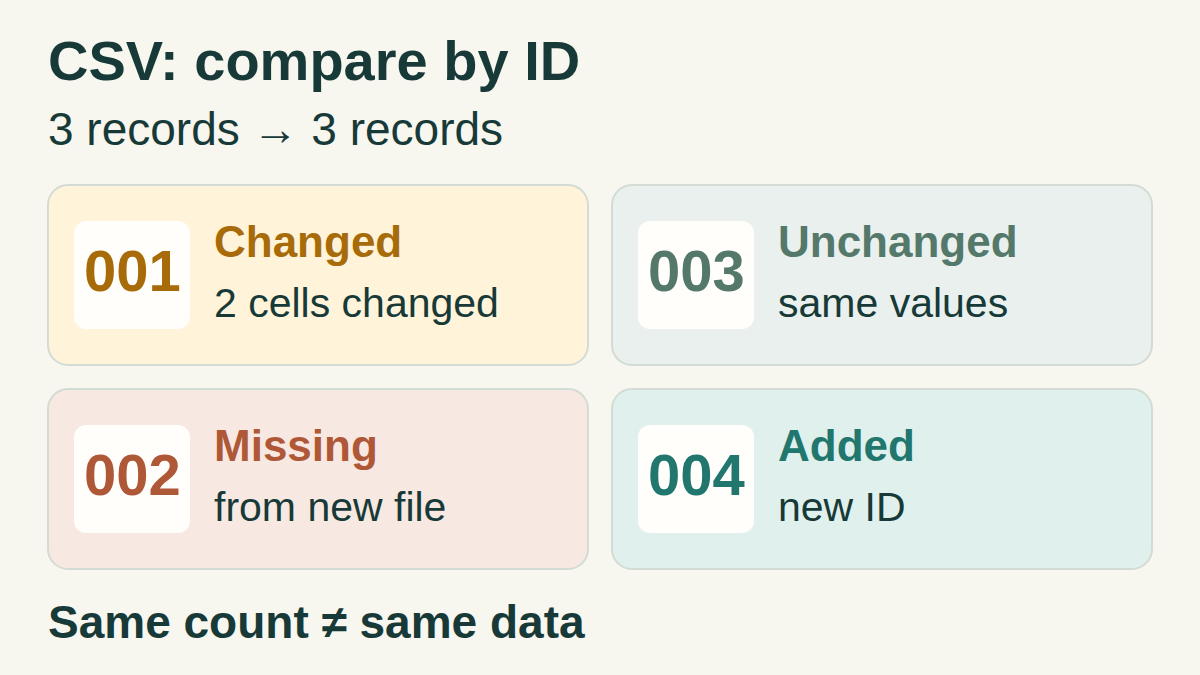
Compare identities before positions
A line-by-line comparison becomes noisy when an export is sorted differently. This recipe matches one record in the old CSV to one record in the new CSV using the same ID. It reports new-only IDs, old-only IDs and changed fields on shared IDs.
Use a column that uniquely identifies a record in both exports. A customer ID is insufficient if a customer can have several orders. This script accepts one key column; it does not infer a composite key.
1. Try two three-record snapshots
Save these invented stationery examples as old.csv and new.csv in UTF-8. Each file has a header and three data records. The record order changes, and the quoted comma in the new label belongs to one field.
old.csv
csv
id,label,qty
001,Blue folder,12
002,Index cards,40
003,Paper clips,25
new.csv
csv
id,label,qty
004,Sticky notes,8
003,Paper clips,25
001,"Blue folder, A4",10
The result to expect
- 004 is added: it occurs only in new.csv.
- 002 is removed from this snapshot: it occurs only in old.csv.
- 001 is one changed record with two changed cells: label changes from Blue folder to Blue folder, A4, and qty changes from 12 to 10.
- 003 is unchanged, even though it moved.
2. Save the local comparison script
Save the complete code below as compare_csv.py beside the two CSV files. It uses the Python standard library. We tested it with Python 3.12.3 on Linux; this guide assumes you can already run Python from a terminal.
The script reads both inputs and prints JSON. It makes no network requests and does not write either input. Use stable local copies that are not being edited during comparison. Both parsed files and the result are held in memory, so choose exports that fit comfortably in memory.
compare_csv.py
python
import argparse
import csv
import json
import sys


def read_snapshot(path, key, delimiter):
    with open(path, encoding="utf-8-sig", newline="") as source:
        reader = csv.reader(source, delimiter=delimiter, strict=True)
        try:
            header = next(reader, None)
            if not header or any(not name.strip() for name in header):
                raise ValueError(f"{path}: missing or blank column name")
            if len(header) != len(set(header)):
                raise ValueError(f"{path}: duplicate column name")
            if key not in header:
                raise ValueError(f"{path}: missing key column {key!r}")
            records = {}
            for row in reader:
                where = f"{path}: record ending at line {reader.line_num}"
                if len(row) != len(header):
                    raise ValueError(f"{where}: expected {len(header)} fields, "
                                     f"got {len(row)}")
                record = dict(zip(header, row))
                identifier = record[key]
                if not identifier.strip():
                    raise ValueError(f"{where}: blank ID")
                if identifier in records:
                    raise ValueError(f"{where}: duplicate ID {identifier!r}")
                records[identifier] = record
        except csv.Error as exc:
            raise ValueError(f"{path}: CSV error near line "
                             f"{reader.line_num}: {exc}") from exc
    return set(header), records


def compare(old, new, columns, key):
    old_ids, new_ids = set(old), set(new)
    added = sorted(new_ids - old_ids)
    removed = sorted(old_ids - new_ids)
    changed = {}
    changed_cells = 0
    for identifier in sorted(old_ids & new_ids):
        fields = {}
        for column in sorted(columns - {key}):
            before, after = old[identifier][column], new[identifier][column]
            if before != after:
                fields[column] = {"old": before, "new": after}
        if fields:
            changed[identifier] = fields
            changed_cells += len(fields)
    return {
        "summary": {
            "old_records": len(old),
            "new_records": len(new),
            "unchanged_records": len(old_ids & new_ids) - len(changed),
            "changed_records": len(changed),
            "added_records": len(added),
            "removed_records": len(removed),
            "changed_cells": changed_cells,
        },
        "added": added,
        "removed": removed,
        "changed": changed,
    }


def main():
    parser = argparse.ArgumentParser(description="Compare CSV snapshots by ID.")
    parser.add_argument("old_csv")
    parser.add_argument("new_csv")
    parser.add_argument("--key", default="id")
    parser.add_argument("--delimiter", default=",")
    args = parser.parse_args()
    if len(args.delimiter) != 1 or args.delimiter in '\r\n\0"':
        parser.error("delimiter must be one character, excluding CR, LF, NUL and quote")
    try:
        old_columns, old = read_snapshot(args.old_csv, args.key, args.delimiter)
        new_columns, new = read_snapshot(args.new_csv, args.key, args.delimiter)
        if old_columns != new_columns:
            missing = sorted(old_columns - new_columns)
            extra = sorted(new_columns - old_columns)
            raise ValueError(f"column sets differ: missing in new={missing!r}; "
                             f"extra in new={extra!r}")
        result = compare(old, new, old_columns, args.key)
    except (OSError, UnicodeError, ValueError) as exc:
        print(f"Error: {exc}", file=sys.stderr)
        return 1
    print(json.dumps(result, ensure_ascii=True, indent=2, sort_keys=True))
    return 0


if __name__ == "__main__":
    sys.exit(main())
3. Run it from that folder
The first path is the old snapshot; the second is the new snapshot. Swap them only if you want to reverse the comparison. Replace id with your exact key-column name and quote paths that contain spaces.
Compare the example
sh
python3 compare_csv.py old.csv new.csv --key idChoose the separator
The default delimiter is a comma. For two semicolon-separated files, add --delimiter ";". Both inputs must use the same delimiter and double-quote convention. The script does not guess the encoding or file format.
For semicolon-separated inputs
sh
python3 compare_csv.py old.csv new.csv --key id --delimiter ";"4. Read records and cells separately
The JSON arrays added and removed contain IDs, not entire records. The changed object groups changed cells under their ID and gives each old and new string. Its two entries for 001 describe one changed record. The unchanged record 003 is included in the summary count rather than listed separately.
Expected summary
json
{
  "added_records": 1,
  "changed_cells": 2,
  "changed_records": 1,
  "new_records": 3,
  "old_records": 3,
  "removed_records": 1,
  "unchanged_records": 1
}
These are the fields inside summary. The complete JSON also contains added, removed and changed.
Reconcile the counts
For the old snapshot: unchanged + changed + removed = 1 + 1 + 1 = 3. For the new snapshot: unchanged + changed + added = 1 + 1 + 1 = 3. Count changed records once, even when several cells changed.
This explains why an unchanged total record count cannot prove that the exports contain the same data. In this example, only one of the three records is unchanged.
A quick control you can run
Run the command with old.csv in both input positions. The summary should show three unchanged records and zero added, removed or changed records. Then make a separate copy containing only a different ordering of those rows: it should produce the same result. Reordering columns also leaves the comparison unchanged when the column names and their values are preserved.
What counts as a difference
- IDs and values remain strings. IDs 001 and 1 are different; values 10 and 10.0 are different. Leading zeros remain intact.
- Spaces, letter case and Unicode forms are not normalized. A nonblank ID with a trailing space is different from the same visible ID without that space.
- CSV quoting syntax is parsed first: 001 and "001" represent the same field value. An optional UTF-8 BOM at the start of a file is ignored.
- Quoted commas and line breaks stay inside their fields. Different line-ending characters inside a field can therefore count as a change.
- A changed ID appears as one removed ID and one added ID. The script cannot establish that they are the same real-world record.
If the script reports an error
A blank or duplicate column name, missing key column, blank or whitespace-only ID, repeated ID, wrong field count or undecodable UTF-8 stops the run. Repeated IDs are rejected even when their rows are identical: matching would be ambiguous. The two files must have the same set of column names; their order may differ.
A header-only file is valid and contains zero records. A completely empty file is invalid. Empty records between data rows are rejected. Python’s normal field-size limit remains in effect. strict=True catches some malformed quoting, but does not validate every possible CSV convention.
Input errors produce an Error message on standard error and a nonzero exit code, with no partial JSON report. Correct the input or parser choice before using a result. Successful comparisons return exit code 0 even when differences exist.
Interpret “removed” in context
Removed means absent from the second file under the chosen key. Check that both exports cover the same population, filters and period, and that export and synchronization have finished. Absence from an incomplete or filtered export does not establish deletion from the original system.
If you save the JSON using shell redirection, use a separate report filename. The shell can truncate its destination before Python starts: never redirect output to either input file.