Practical spreadsheets and data
Find duplicate CSV rows in Python: exact matches and conflicting IDs
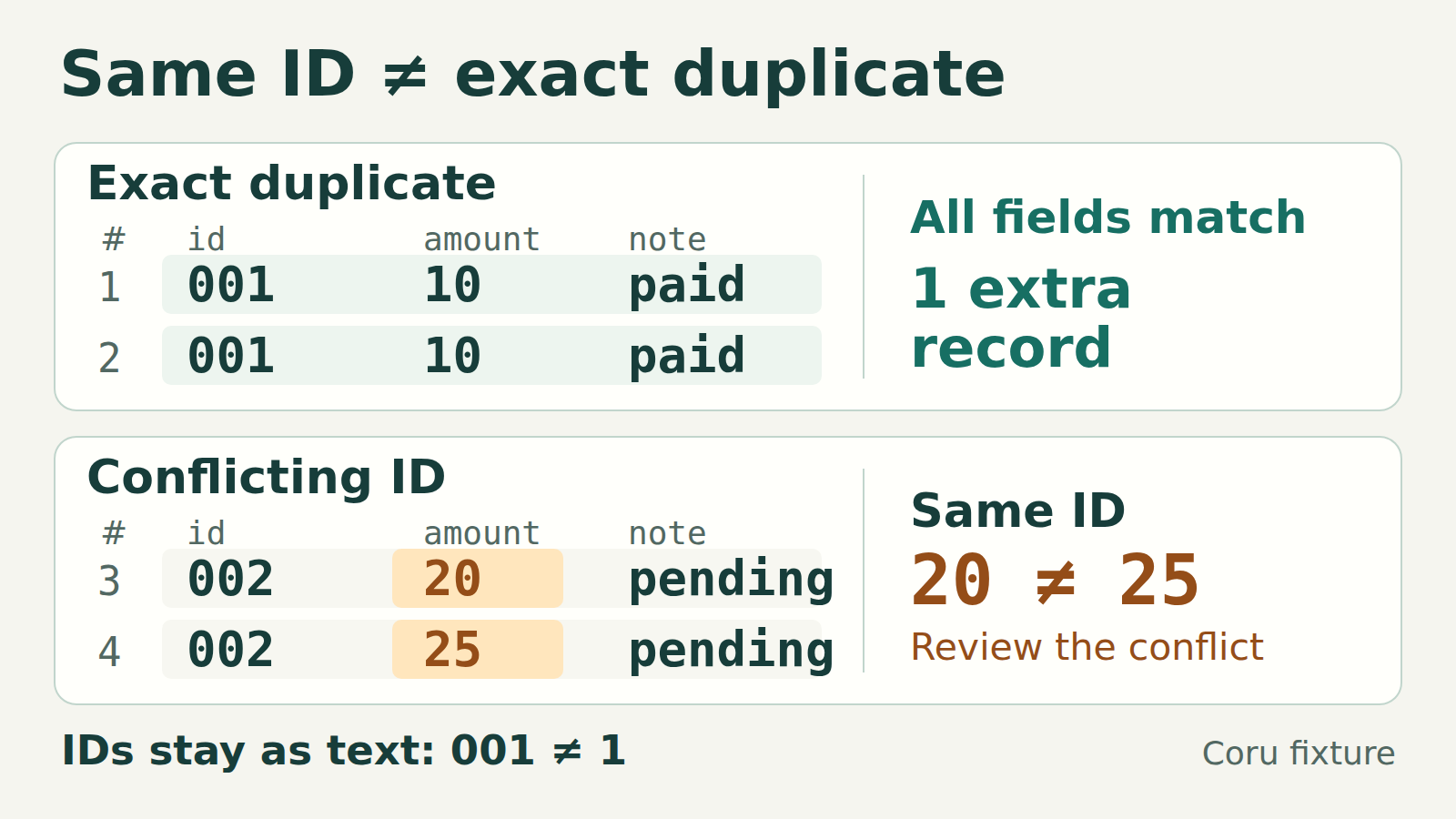
An identical record and a repeated ID are different findings. This local check reports both, keeps leading zeros and spaces, and leaves the original CSV untouched.
First decide what “duplicate” means
Two CSV records can share an ID while disagreeing about an amount, address or status. Deleting every repeated ID can hide that disagreement. Start with two separate checks: identical complete records, and repeated IDs attached to different records.
Here, an exact duplicate means every parsed field string matches in the same column order. It does not mean the original CSV bytes match: 001 and "001" decode to the same value. A conflicting ID means that one nonempty ID has at least two distinct complete records. Whether the difference is an error depends on what the ID identifies.
1. Try a five-record example
Save this text as sample.csv in UTF-8. The first CSV record is the header; data record numbers start at 1 after it. ID 001 appears twice with the same amount and note. ID 002 appears with two different amounts. ID 003 appears once.
sample.csv
csv
id,amount,note
001,10,paid
001,10,paid
002,20,pending
002,25,pending
003,30,paid
Keep these values as text. The leading zeros are part of each ID.
2. Run a local, read-only check
Use Python 3 and save the complete script below as check_csv.py beside sample.csv. It uses only the standard library. We ran the examples with Python 3.12.3 on Linux. The script opens its input for reading and prints a JSON report; it creates no cleaned CSV and makes no network requests.
Use a stable local copy that is not being edited during the check. This is an in-memory workflow: it retains distinct records, their positions and ID groups, so memory use grows with the input. Start with small exports that fit comfortably in memory; this is not a method for arbitrarily large files.
check_csv.py
python
import argparse
import csv
import json


def inspect_csv(path, key, delimiter):
    rows, keys, empty_ids = {}, {}, []
    total = 0
    with open(path, encoding="utf-8-sig", newline="") as source:
        reader = csv.reader(source, delimiter=delimiter, strict=True)
        header = next(reader, None)
        if not header or any(name == "" for name in header):
            raise ValueError("missing or empty header name")
        if len(set(header)) != len(header):
            raise ValueError("duplicate header name")
        if key not in header:
            raise ValueError(f"ID column not found: {key!r}")
        column = header.index(key)
        for total, fields in enumerate(reader, 1):
            if len(fields) != len(header):
                raise ValueError(
                    f"record {total}, ending on line {reader.line_num}: "
                    f"expected {len(header)} fields, got {len(fields)}"
                )
            row = tuple(fields)
            rows.setdefault(row, []).append(total)
            value = fields[column]
            if value == "":
                empty_ids.append(total)
            else:
                keys.setdefault(value, set()).add(row)
    duplicates = [numbers for numbers in rows.values() if len(numbers) > 1]
    conflicts = [
        {"id": value, "records": sorted(n for row in variants for n in rows[row])}
        for value, variants in keys.items() if len(variants) > 1
    ]
    return {
        "records": total,
        "exact_duplicate_groups": duplicates,
        "extra_exact_records": sum(len(group) - 1 for group in duplicates),
        "conflicting_ids": conflicts,
        "empty_id_records": empty_ids,
    }


def main():
    parser = argparse.ArgumentParser(description="Inspect CSV; do not change it.")
    parser.add_argument("file")
    parser.add_argument("id_column")
    parser.add_argument("--delimiter", choices=[",", ";", "\t"], default=",")
    args = parser.parse_args()
    try:
        report = inspect_csv(args.file, args.id_column, args.delimiter)
    except (OSError, UnicodeError, csv.Error, ValueError) as error:
        parser.exit(1, f"No report: {error}\n")
    print(json.dumps(report, ensure_ascii=False, indent=2))


if __name__ == "__main__":
    main()
The input must be UTF-8, with or without an initial BOM, and have a header with distinct, nonempty names.
Run from the folder containing both files
bash
python3 -B check_csv.py sample.csv idThe final argument is the exact name of your ID column, including its capitalization.
Choose the delimiter deliberately
The default separator is a comma. For a semicolon-separated file, add --delimiter ";" to the command. The script also accepts a literal tab as the delimiter argument. It uses double quotes around quoted fields and doubled double quotes within them. It does not guess an encoding, separator, header or ID column. A file with a different quoting convention needs a matching parser configuration.
The report for sample.csv
json
{
  "records": 5,
  "exact_duplicate_groups": [
    [
      1,
      2
    ]
  ],
  "extra_exact_records": 1,
  "conflicting_ids": [
    {
      "id": "002",
      "records": [
        3,
        4
      ]
    }
  ],
  "empty_id_records": []
}
The report appears only after the whole input has been read successfully.
3. Read the two findings separately
- records is 5: it excludes the header. exact_duplicate_groups contains [1, 2], meaning those two complete records match.
- extra_exact_records is 1: a group of two contains one occurrence beyond the first. This count is a description, not permission to delete it.
- conflicting_ids identifies 002 and records [3, 4]. Look back at the amount column: 20 and 25 differ. Keeping the first or last record would choose a value without establishing which one is correct.
- empty_id_records is empty here. In your file, records with an exactly empty ID appear in that list and are excluded from ID-conflict grouping. Their complete records still participate in the exact-duplicate check.
The categories can overlap
If a file contains two identical copies of 002,20,pending and another record 002,25,pending, the first two form an exact-duplicate group and all three belong to one conflicting ID. Do not add the lengths of the two lists to estimate a number of records to remove.
A repeated ID is only suspicious when that column should identify one record. A customer ID can legitimately appear on several orders. If identity depends on several columns, this one-column check is insufficient: establish the composite key before deciding which differences matter.
What stays different
The check does not trim spaces, change case, normalize Unicode or convert numbers. IDs 001 and 1 remain different. A space-only ID is not empty. Amount strings 10 and 10.0 differ, and paid differs from paid followed by a space. These literal comparisons make formatting differences visible instead of silently deciding they are harmless.
Quoted commas and quoted line breaks belong to fields. Record 3 is therefore not necessarily physical line 4 in your editor. Line-ending characters inside a quoted field are also compared literally; a CRLF and an LF inside that field can produce a conflict. The optional UTF-8 BOM is removed only from the beginning of the file.
If the check stops
A missing or empty header name, duplicate header name, missing ID column, wrong number of fields or undecodable UTF-8 stops the run. An empty CSV record outside a quoted field is rejected as a zero-field record; a record of empty fields with the correct width is different. A header-only file succeeds with zero data records.
The parser uses strict=True, but that is not complete validation of every CSV rule or dialect. Our lab rejected an unfinished quoted field and text after a closing quote, while a quote within an unquoted field was accepted. Python’s normal field-size limit also remains in effect. A late error produces “No report” instead of a partial JSON result; fix the input or configuration and rerun.
Before removing anything
Keep the original, inspect the reported records and confirm the business meaning of the ID. Identical records can still represent separate legitimate events. For conflicting values, compare with the source export or the system responsible for the record and define a resolution rule. After an approved cleanup in a separate copy, rerun the check and reconcile the resulting record count. A zero-conflict report proves only that no nonempty ID in this chosen column has differing records under these literal comparison rules.