Blank cells vs zero in Excel: why your average changes
AVERAGE includes numeric zeros and skips empty cells in a range. That changes the denominator. Keep the meaning of each row visible: a recorded zero is an observation; a missing record is unknown.
Six hours, four records
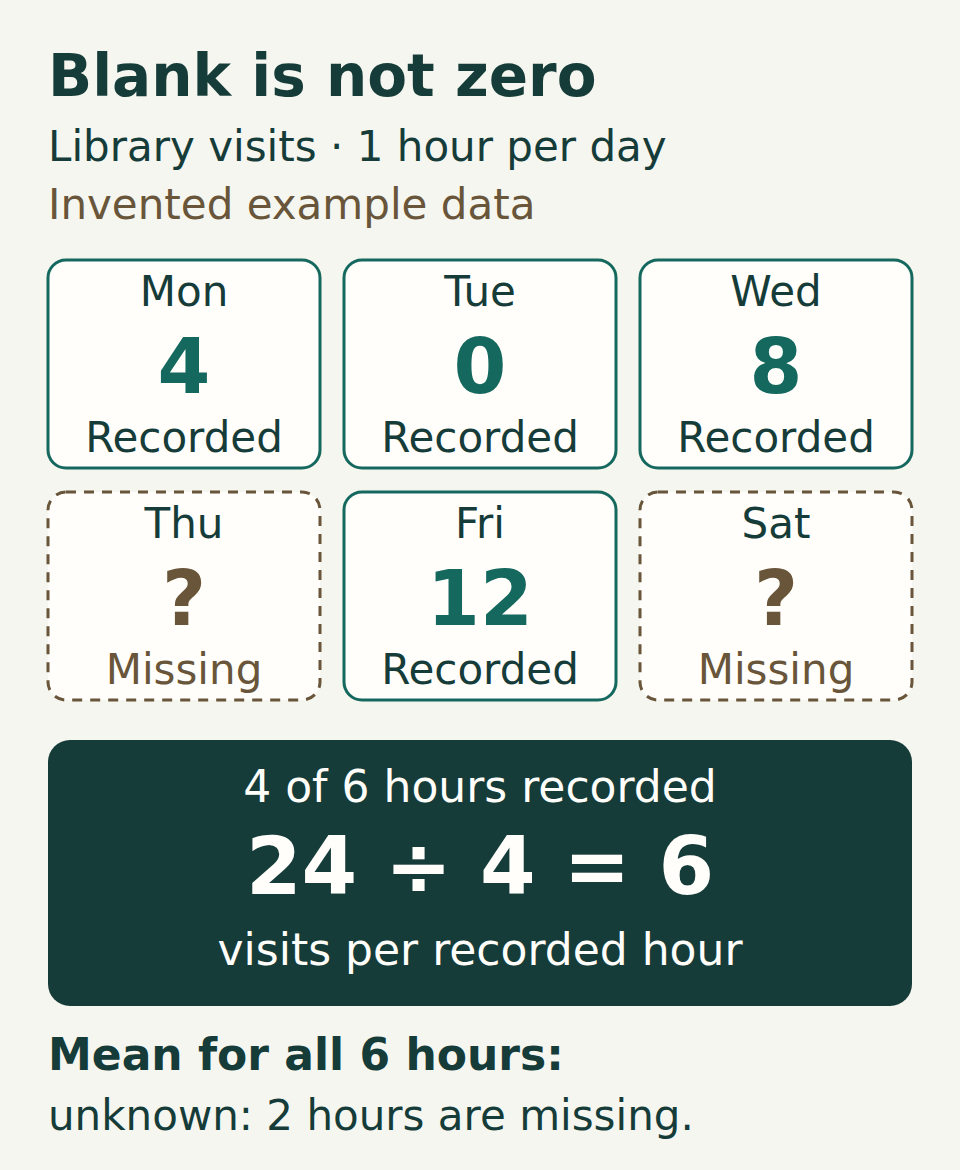
Imagine a library counting visits during the same one-hour slot on six days. The recorded counts are 4, 0, 8, missing, 12, missing. These are invented teaching data.
Tuesday’s zero means someone observed the whole hour and recorded no visits. Thursday’s and Saturday’s records are missing: we do not know their counts. The library was open for all six slots. A missing record therefore does not mean that the library was closed or that nobody came.
Enter the example in Excel
Copy the tab-separated block into cell A1 of a blank sheet. Column B holds the visit counts; column C explains each record. B5 and B7 must stay genuinely empty. Do not type a dash, a space or the word “missing” into those two value cells.
If pasting puts everything into one column, enter the values in B2:B7 yourself: 4, 0, 8, leave empty, 12, leave empty. Enter the four counts as numbers.
Example data: paste at A1
tsv
Day	Visits	Record
Mon	4	Observed
Tue	0	Observed; no visits
Wed	8	Observed
Thu		Missing record
Fri	12	Observed
Sat		Missing record
The two empty fields in the Visits column are intentional. All six slots have the same duration.
Check the denominator, not just the answer
Put each formula below in a separate cell outside A1:C7. SUM returns 24, COUNT returns 4 and AVERAGE returns 6. The calculation is (4 + 0 + 8 + 12) ÷ 4 = 6 visits per observed hour.
COUNT counts numeric cells in this range, including the zero. AVERAGE uses the four numeric observations; the two empty cells contribute neither a value nor an observation. The zero adds nothing to the total, but it adds one to the denominator.
Three checks using English function names
excel
=SUM(B2:B7)
=COUNT(B2:B7)
=AVERAGE(B2:B7)
Expected results, in order: 24, 4, 6. With Russian function names: СУММ, СЧЁТ and СРЗНАЧ.
Three answers, three different meanings
- 6: keep the recorded zero and leave the two unknown counts empty. This is the mean of the four recorded hours: 24 ÷ 4.
- 4: put a numeric zero into each missing cell. The calculation becomes 24 ÷ 6. You have assumed that both unrecorded hours had no visits; the original records do not support that assumption.
- 8: exclude Tuesday’s valid zero and leave the unknown cells empty. The calculation becomes 24 ÷ 3. This describes the three recorded hours with at least one visit, not all four recorded hours.
Try the changes on a copy
Duplicate the sheet before experimenting. In the copy, enter 0 in B5 and B7: COUNT changes to 6 and AVERAGE to 4. Clear the contents of B5 and B7 again: the results return to 4 and 6.
Next, clear B3, which held Tuesday’s measured zero. COUNT becomes 3 and AVERAGE becomes 8. Restore the zero in B3. In each step SUM stays at 24, so checking only the total would miss the change in meaning.
Report what you actually know
A useful summary is: “Mean: 6 visits per observed hour; records available for 4 of 6 one-hour slots, with 2 missing.” The 24 is the total for the four recorded slots. The exact total and mean for all six slots are still unknown.
If the missing records later turn up, enter their verified counts and recalculate. If your source uses 0 as a code for “not recorded”, first check that convention and separate those codes from genuine zero counts. Preserve the original data and document your interpretation.
Leaving unknown values empty does not make the observed mean representative of the missing hours. For example, if records were more often lost during busy periods, the four available counts could give a distorted picture of all six. This calculation describes the available records; it does not estimate the missing values.
If your result differs
- Check B2:B7. The example needs four numeric cells, including one zero, and two genuinely empty cells. Keep the heading and notes outside the formula range.
- Check the numeric count. In a range, AVERAGE and COUNT skip text, including a number stored as text. A visible “8” is not enough to prove that Excel is using it as a number.
- Inspect a blank-looking cell before changing it. A zero can be hidden by display settings while remaining a numeric zero in the calculation. Appearance alone does not identify its contents.
- If there are no numeric observations, there is no observed mean to report. Find out why the records are missing rather than reporting zero.
Which mean can you report?
Keep the recorded zero separate from the missing count. Choose an answer, or open the explanations below.
Answers and explanations
- 4 visits per recorded hour; 3 of 4 slots recorded: Yes. The recorded counts sum to 12, and the zero is one of three observations: 12 ÷ 3 = 4. The missing slot remains unknown.
- 3 visits per hour; divide by all 4 slots: 12 ÷ 4 = 3 assumes that the missing slot had zero visits. That is not established by the records.
- 6 visits per recorded hour; ignore the zero: 12 ÷ 2 = 6 excludes a valid observation. The zero belongs in the denominator for the three recorded slots.