Excel TRIM not removing spaces? Check the character code
Two codes can look the same yet contain different characters. Excel TRIM handles ordinary spaces, but not the nonbreaking space U+00A0. Identify the character first, then apply only the replacements your identifiers allow.
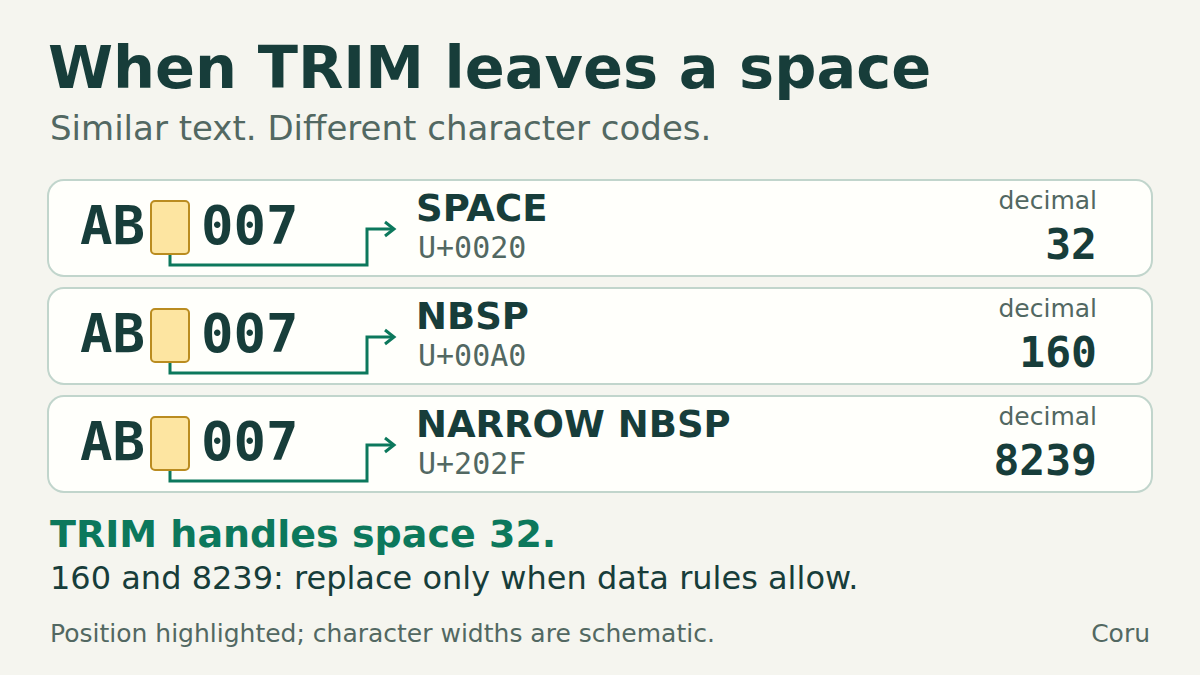
A lookup mismatch is a clue, not a diagnosis
If a lookup cannot find a code that appears to be present, compare the underlying text. A normal space, a nonbreaking space and a narrow nonbreaking space can be hard to distinguish on screen. This guide isolates that problem with five invented versions of AB 007.
In this example, one ordinary space between AB and 007 is meaningful. The rules deliberately allow extra outer spaces, repeated ordinary spaces and the two named nonbreaking spaces to be normalized. Real identifiers may have different rules: confirm them before changing anything.
Build the five examples
In a blank worksheet, put Code, Length, Third character and Cleaned in A1:D1. Paste the following five lines into A2:A6. Each line starts with = and creates text; do not put all five lines into one cell. The digits 007 stay part of the text.
Input formulas for A2:A6
text
="AB 007"
="AB  007"
="AB"&UNICHAR(160)&"007"
="AB"&UNICHAR(8239)&"007"
="  AB 007  "
For English function names. Row 3 has two ordinary spaces; row 6 has two at each end.
Inspect length and the suspected position
Enter =LEN(A2) in B2 and =UNICODE(MID(A2,3,1)) in C2, then fill both down to row 6. The second formula reports the Unicode code point of the third character, not every space in the cell. Here the separator is third in rows 2–5. In row 6, the two leading spaces put A third, so the result is 65. For your own code, change the position to the character you actually suspect.
Expected diagnostic results
text
Row   Length   Third character
2     6        32
3     7        32
4     6        160
5     6        8239
6     10       65
32 = ordinary space U+0020; 160 = nonbreaking space U+00A0; 8239 = narrow nonbreaking space U+202F. Equal length does not prove equal text.
Why TRIM alone is insufficient
TRIM removes ordinary spaces at the ends and reduces repeated ordinary spaces inside the text to one. It does not remove U+00A0. Our other nonbreaking example, U+202F, also needs an explicit replacement in this recipe.
Do not remove every space just to make a lookup succeed: AB007 and AB 007 may be different identifiers. This formula is appropriate only when your data rules treat the listed variants as the same code.
Clean a helper column
text
=TRIM(SUBSTITUTE(SUBSTITUTE(A2,UNICHAR(160)," "),UNICHAR(8239)," "))Enter in D2 and fill down to D6. Each replacement string contains one ordinary space. All five example rows should produce AB 007, length 6.
What the formula does
The inner SUBSTITUTE replaces every U+00A0 with an ordinary space. The outer SUBSTITUTE does the same for U+202F. TRIM then tidies the ordinary spaces. The original column A remains available for comparison.
This is a recipe for these two specified Unicode characters, not a universal invisible-character cleaner. Tabs, line breaks, zero-width characters, text-versus-number differences and letter lookalikes need separate diagnosis. Do not add more replacements without identifying the difference.
Check the result before using it as a key
- Apply the same permitted normalization to helper columns on both sides of the lookup. Cleaning just the search value may leave the other side different.
- Check which distinct originals now have the same cleaned key. Sort the entire table by the helper column, keeping each source row together, then inspect repeated keys. The five examples intentionally collapse to one key; in real records, that could hide a conflict.
- Keep the source ID and leading zeros. Do not convert codes to numbers to solve a spacing issue. If an earlier import already removed zeros, this formula cannot reconstruct them.
- Only use the cleaned column for matching after you have checked the equivalence rule and duplicate keys. If the mismatch remains, inspect text type and other character positions.
Russian Excel function names
The corresponding functions are СЖПРОБЕЛЫ, ПОДСТАВИТЬ, ЮНИСИМВ, ДЛСТР and ПСТР. UNICODE retains its Latin name. For the length use =ДЛСТР(A2), and for the third character use =UNICODE(ПСТР(A2;3;1)). The Russian recipe is shown below. Separators depend on regional settings; these examples use commas for English and semicolons for Russian.
The same cleanup with Russian function names
text
=СЖПРОБЕЛЫ(ПОДСТАВИТЬ(ПОДСТАВИТЬ(A2;ЮНИСИМВ(160);" ");ЮНИСИМВ(8239);" "))Use the function names accepted by your Excel installation.
Choose the safe next step
Use the character code and the stated identifier rule. The answers are also available below without JavaScript.
Answers and explanations
- Replace U+00A0 explicitly, then review the cleaned keys: Yes. Map the known character to an ordinary space and check whether distinct originals now share a key.
- Apply TRIM alone: TRIM alone does not remove the nonbreaking space U+00A0.
- Delete every space in every code: That would also remove the meaningful separator in AB 007. The intended result is AB 007, not AB007.