Reverse percentages: find the original value after a change
Divide the final value by the fraction of the original that remains. After a 30% decrease, 70% remains: 84 ÷ 0.70 = 120. Adding 30% to 84 uses the wrong base.
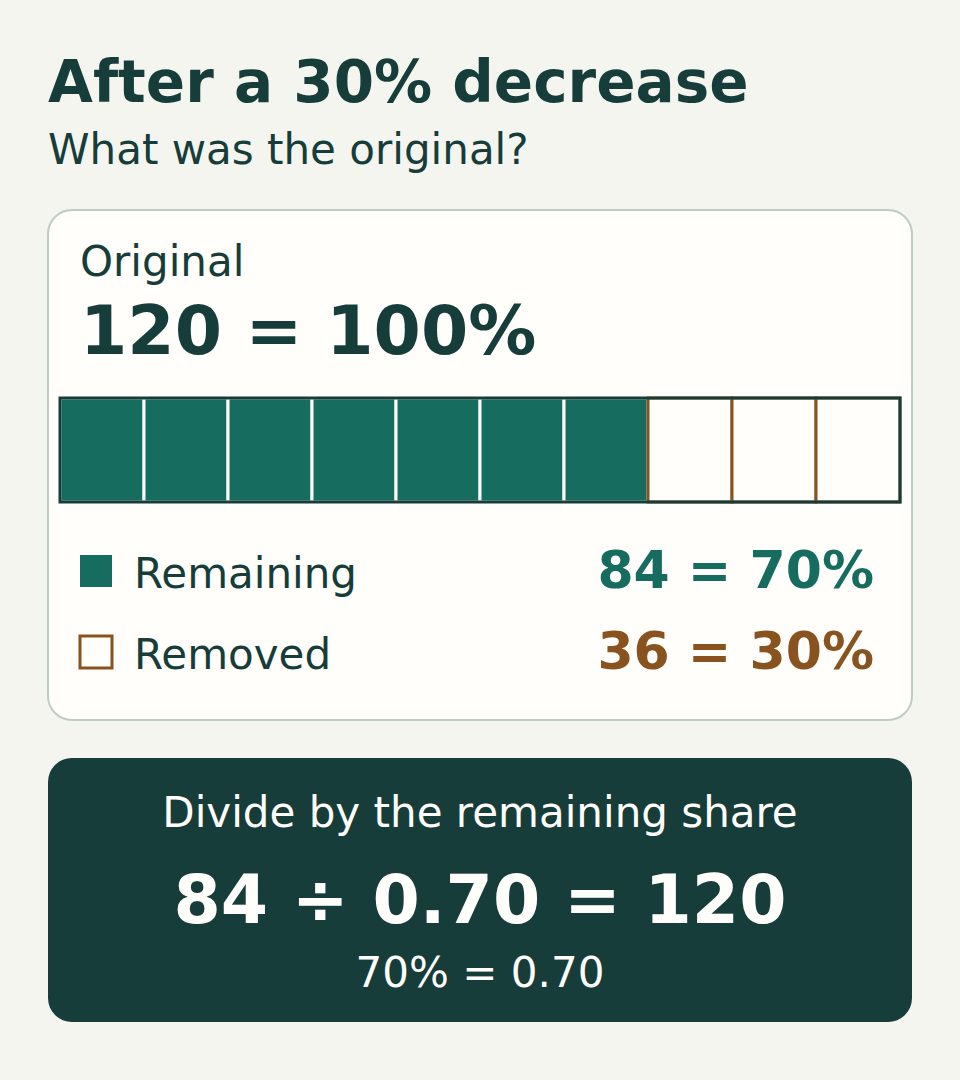
84 is the reduced price, not the starting price
Imagine a notebook set costs 84 after a 30% discount. What was its original price? The amounts in this guide are invented examples in the same unspecified currency, with exact percentages unless stated otherwise.
The original price is 100%. A 30% discount leaves 70%, so 84 represents 70% of the original. One percent is 84 ÷ 70 = 1.2; all 100% is 1.2 × 100 = 120. Equivalently, divide by 0.70: 84 ÷ 0.70 = 120.
Check forward: 30% of 120 is 36, and 120 − 36 = 84. The check reproduces the amount you were given.
Why adding 30% does not undo the discount
84 × 1.30 = 109.2, not 120. That adds 30% of 84, which is 25.2. The original discount removed 30% of 120, which was 36. The two percentages use different starting amounts.
To get from 84 back to 120 requires an increase of (120 − 84) ÷ 84 ≈ 42.86%. You do not need to calculate that return percentage to find the original: divide by the remaining fraction instead.
Choose the multiplier, then divide
After a decrease of r: final = original × (1 − r), so original = final ÷ (1 − r). For a 30% decrease, r = 0.30 and the multiplier is 0.70.
After an increase of r: final = original × (1 + r), so original = final ÷ (1 + r). If a price is 92 after a 15% increase, the original was 92 ÷ 1.15 = 80. Check: 80 × 1.15 = 92.
These examples use a nonnegative increase rate, or a decrease from 0% up to but excluding 100%. After a 100% decrease, the result is zero whatever the original was: the original cannot be recovered from that result alone.
Use the same calculation in Excel
Put the final amount 84 in B2 and type 30% in C2. In D2 enter the decrease formula below. It returns 120. Format D2 as a number or currency, not a percentage.
For an increase, use the second formula instead. With B2 = 92 and C2 = 15%, it returns 80. These formulas use only arithmetic operators and cell references, so no function-name translation is needed.
After a decrease
excel
=B2/(1-C2)C2 contains a positive decrease rate, entered with the % sign. For B2 = 84 and C2 = 30%, D2 = 120.
After an increase
excel
=B2/(1+C2)C2 contains a positive increase rate, entered with the % sign. For B2 = 92 and C2 = 15%, D2 = 80.
Check the cells, not just the displayed digits
Typing 30% enters the rate 0.30. A numeric cell containing 30 without the percent sign is a different value; changing its display to Percentage does not turn it into 0.30. Enter the rate with the % sign explicitly.
Use numeric inputs. If the final value was imported as text, fix that input before interpreting a formula result. Keep intermediate values unrounded; round the final result only as your task requires. A displayed value may hide more decimal places.
Two changes need two multipliers
Suppose an original price first falls by 20%, then rises by 10% of the reduced price. Starting at 120 gives 120 × 0.80 × 1.10 = 105.6. The combined multiplier is 0.88: a net decrease of 12%, not 10%.
If you know only the final 105.6 and those two exact changes, reverse the process: 105.6 ÷ 1.10 ÷ 0.80 = 120. This assumes each percentage applies to the amount immediately before it and that no fixed fee or other change was added.
What if the amount or rate was rounded?
The formula returns an exact original only when the inputs describe the change exactly. If a displayed final price or a reported percentage was rounded, dividing can give an estimate of the original. For example, 100 increased by 12.345% becomes 112.345; a displayed 112.35 gives 112.35 ÷ 1.12345 ≈ 100.00445.
Check the stated rounding rule and any extra charges before treating a reconstructed amount as exact. The small difference in this example comes from the rounded final amount, not a different reverse-percentage formula.
Try it: reverse an increase
Work out what percentage of the original the new price represents. Choose an answer or open the explanations below.
Answers and explanations
- 90: Yes. 126 is 140% of the original: 126 ÷ 1.40 = 90. Check: 90 × 1.40 = 126.
- 75.6: This subtracts 40% of the new price: 126 × 0.60. The increase was 40% of the original, so divide 126 by 1.40.
- 176.4: This increases 126 by another 40%. To undo the original increase, divide 126 by 1.40.
A four-step check for your own numbers
- Name the original quantity that the percentage refers to.
- Convert the change to a multiplier: 1 − rate for a decrease, 1 + rate for an increase.
- Divide the final value by that multiplier.
- Apply the original change to your answer and compare it with the given final value.